What it does
Four tabs, four different searches
Each one solves a case the others cannot. Together they cover almost everything that goes missing indoors.
Scan
Bluetooth scanner
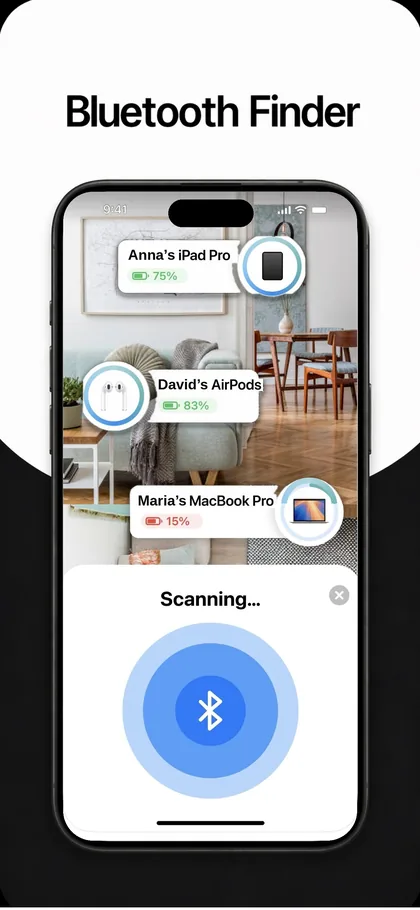
Every device broadcasting nearby, with name, battery and live signal strength.
Clap · new
Clap to find
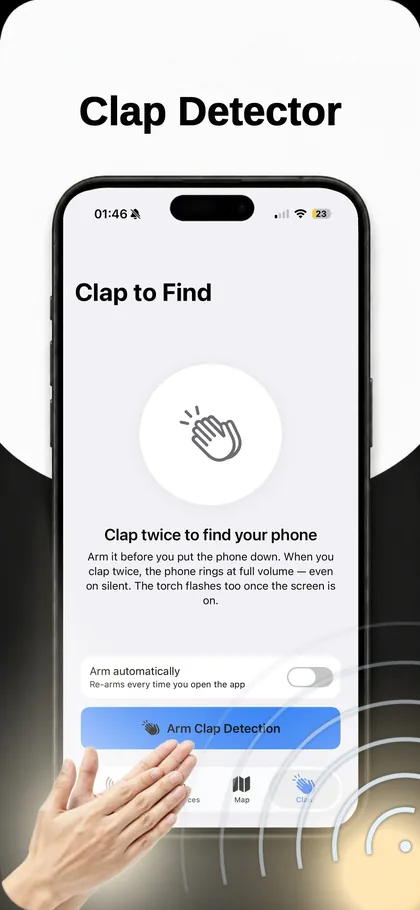
Two claps and the phone rings at full volume, even on silent, and flashes the torch.
Map · new
Last-seen map
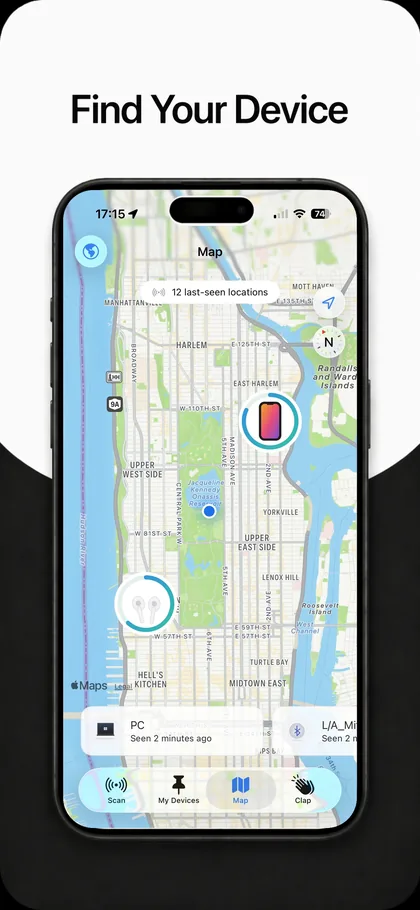
Where each saved device was last detected, a pin that survives the battery dying.
My Devices
My Devices
Name what you own so it is pinned in every scan and tracked on the map.
Clap tab·New in v1.2
Clap twice. It rings on silent.
Calling your own phone fails for the one reason it always fails: the ringer is off. Arm clap detection before you put the phone down, and two claps make it ring at full volume regardless, and flash the torch once the screen wakes.
Scan tab
See everything that’s broadcasting
Every Bluetooth Low Energy device around you, with its name, battery level where the device reports one, and live signal strength. Pick the one you want and the rest drops away, so you are following a single signal instead of twenty.
Map tab·New in v1.2
Where it was last seen
Every time your iPhone detects a device you have saved, the position and time are recorded. The map holds that history, which means a pin survives the device’s battery dying, and tells you which building to search before you start searching rooms.
Lost something right now?
Start with what you’ve lost
Each guide covers where that device actually ends up, how long its battery gives you, and how to close the last two metres.
Unknown devices
Something is broadcasting and you don’t know what it is
Usually a neighbour’s television. Occasionally not. There is a specific, testable way to tell the difference.
Identify
An unknown device is showing up
How to work out what it is, and the two-location test that separates a neighbour from a tracker.
iOS alerts
“Unknown Accessory Detected”
What the iPhone alert actually means, the common false alarms, and what to do next.
Safety
Is someone tracking you?
A practical check, where trackers are actually placed, and where to get help.
How it works
Three minutes to set up
- ScanOpen the app and allow Bluetooth. Everything nearby appears immediately, there is no pairing step and nothing to configure.
- Save what’s yoursName the devices you own. They get pinned to the top of every scan, and their positions start being recorded on the map.
- Arm the clapTurn on Arm automatically and your phone becomes findable by sound from then on, whatever the ringer switch says.
Pricing
Free to download
The app is free with in-app purchases. Everything is billed through your Apple ID and can be cancelled in your iPhone settings at any time.
1 week
$5.99
Billed to your Apple ID. Cancel any time in Settings.
1 month
$12.99
Billed to your Apple ID. Cancel any time in Settings.
1 year
$49.99
Billed to your Apple ID. Cancel any time in Settings.
US App Store prices·Local prices set by Apple·Subscription terms
Questions
Common questions
What does Find My Device₊ actually do?
It scans for Bluetooth Low Energy devices around you, shows their name, battery and live signal strength so you can walk toward them, records where your saved devices were last detected on a map, and rings your iPhone at full volume when you clap twice, even when the phone is on silent.
Is it the same as Apple’s Find My?
No, and it is worth being clear about the difference. Apple’s Find My works with Apple hardware and the crowd-sourced Find My network. This app works with any Bluetooth Low Energy device, third-party headphones, speakers, tags, wearables, but it finds them using your own phone rather than a network of strangers’ phones. Most people use both.
Does it work with non-Apple devices?
Yes. Anything broadcasting over Bluetooth Low Energy appears in a scan, whatever brand it is. That is the main reason to use it alongside Find My rather than instead of it.
Can it find a device that is switched off or flat?
It cannot detect it live, a device with no power sends no signal. What it can do is show you the last place it was seen while it was still transmitting, which for a device dropped somewhere in your own day is usually the answer.
What data does the app collect?
None. The App Store privacy label for the app is Data Not Collected. There is no account to create and your device list and location history stay on your iPhone.
What does it cost?
The app is free to download with in-app purchases. Subscription options are $5.99 per week, $12.99 per month and $49.99 per year. Subscriptions are billed through your Apple ID and can be cancelled any time in your iPhone settings.
Free · iPhone · iOS 17.0+
It’s probably two metres away
Scan, follow the signal, and stop searching the same three surfaces.

People also look for
- How to find a misplaced baby monitor unit
- How to find a lost VR headset or controller
- How to find something lost in a car
- How to help someone else find their phone
- An unknown Bluetooth device is showing up. What is it?
- How to scan a room for hidden Bluetooth devices
- What is “Fire TV” on Bluetooth?
- What is “Momentum” on Bluetooth?
- How to find something you left on a plane
- Google’s Find Hub and iPhone owners