Arm clap detection before you put your phone down. Clap twice and the phone rings at full volume, even on silent, and flashes the torch once the screen wakes.
Requires iOS 17.0 or later·iPhone
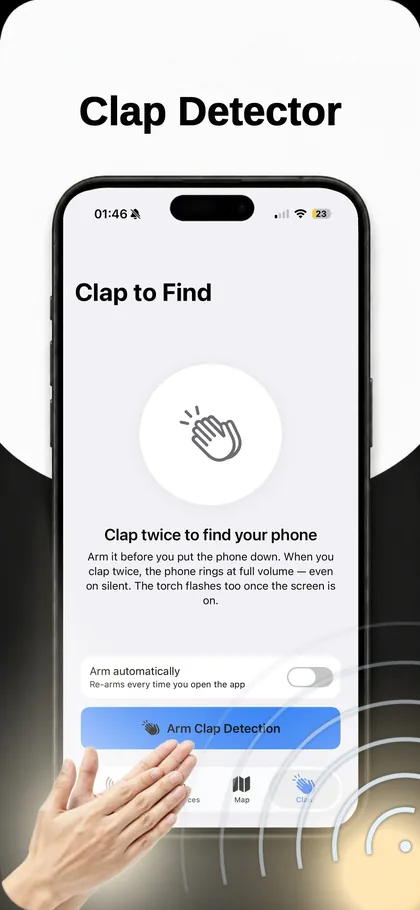
How it works
- Open the Clap tabGrant microphone access. The app listens for a clap pattern locally on the device and never records or uploads audio.
- Arm clap detectionTap Arm Clap Detection before you set the phone down. Turn on Arm automatically and it re-arms every time you open the app, so you never have to remember.
- Clap twiceTwo sharp claps, about half a second apart. One clap is ignored on purpose, a single sound is far too easy to trigger by accident.
- Follow the soundThe phone rings at full volume regardless of the ringer switch or volume level, and the torch flashes once the screen is on, which helps in a dark room or under a blanket.
When you’d use it
The phone is on silent
The classic dead end. You call it from another phone, hear nothing, and give up. Clap detection bypasses the ringer entirely.
You are alone and have no second phone
There is nobody to call you and no laptop signed in. Two claps is the whole method.
It is dark
Under the duvet, down the side of the bed, in a bag. The torch flash gives you a visual target when the sound is muffled.
Requirements
| Platform | iPhone, iOS 17.0 or later |
|---|---|
| Added in | Version 1.2, see what’s new |
| Permissions | Microphone |
| Account needed | No, no sign-up, nothing collected |
| Works offline | Yes |
More of what the app does
Each feature covers a case the others cannot.
- Last-seen map for your devices, Map tab
- Save the devices you care about, My Devices tab
- Get warmer, get colder, Inside Scan
- Bluetooth scanner for iPhone, Scan tab
- How to find something in the dark, Method
- Transmit power: How loudly a device broadcasts
- All features, the complete list
Common questions
Does clap detection work when the phone is on silent?
Yes. That is the point of it. When the clap is detected the phone rings at full volume regardless of the ringer switch position or the current volume setting.
Does it record what I say?
No. The microphone is used to detect a short, sharp two-clap pattern and audio is processed on the device in the moment. Nothing is recorded, stored or sent anywhere. The App Store privacy label for the app is Data Not Collected.
Why two claps instead of one?
A single loud sound happens constantly, a door, a dropped book, a cough. Requiring two claps in quick succession cuts false triggers to almost nothing without making the gesture harder to perform.
Does it drain the battery?
Clap detection is only active while it is armed, and listening for a sound pattern is a low-power operation. If you leave it armed all day you will notice a small cost; the Arm automatically option is designed so you can arm it in the moment instead.
Will it work if the phone is completely dead?
No. A phone with no battery cannot listen or ring. Check the last-seen map instead, it holds the last position recorded while the phone was still alive.